
Registration on 2fun bet is intentionally simple: a mobile number, a verification code, a password, and you are inside the lobby. Because it is so quick, most people rush it — and then discover weeks later that the number on the account does not match the wallet they want their winnings paid into, or that a friend's referral bonus never applied. This page covers the whole process slowly enough that you get all of it right on the first attempt.
What you need before signing up
- An active mobile number that can receive SMS, ideally the same number registered to your Easypaisa or JazzCash account.
- A password you do not use elsewhere — this account holds money.
- A referral link or code, if someone invited you. This must be used before the account is created.
- The app installed, or the game's site open in your browser. See the install guide if you have not done that yet.
How to register step by step
- 1Open through the correct linkIf a friend invited you, open their invitation link first so the referral is attached to your new account. Referral credit cannot be added afterwards.
- 2Choose register instead of guestSome builds allow a guest session for browsing. A guest account cannot withdraw, so register properly before you deposit anything.
- 3Enter your mobile numberSelect the correct country code and type the number carefully. This number becomes your login ID and the anchor for account recovery.
- 4Verify the OTPA one-time code arrives by SMS within a few seconds. Enter it before it expires. Never repeat this code to anyone, including someone claiming to be support.
- 5Set a strong passwordUse at least ten characters mixing letters, numbers and a symbol. Do not reuse your email or wallet password.
- 6Complete your profileAdd your name exactly as it appears on the mobile wallet you will withdraw to, and bind any additional recovery details the app offers.
Referral codes and Invite & Earn
The referral system rewards the inviter when invited players make a first deposit, with milestone rewards that grow as more friends qualify — one, five, ten, fifteen and thirty invited depositors each unlock a larger amount. Sharing options include WhatsApp, Telegram, Facebook and a plain copy link.
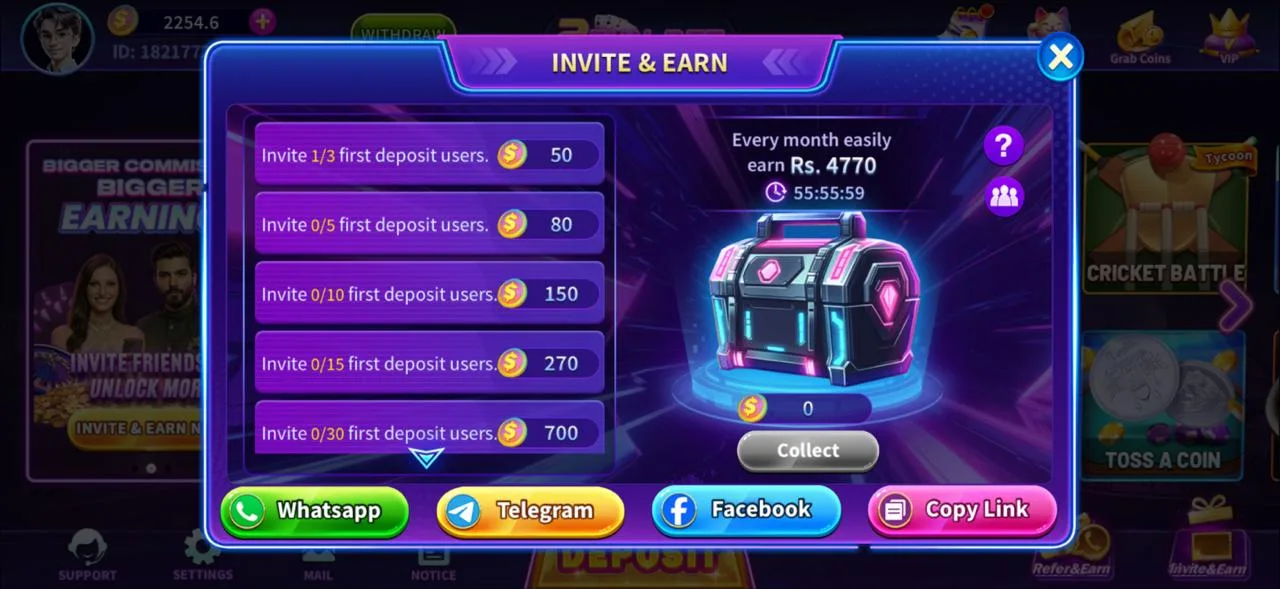
If you were invited, opening the inviter's link before registration is the only way the connection is recorded. If you want to invite others later, you will find your own link under Refer & Earn or Invite & Earn in the lobby. Share it with people who were already curious about the app; mass-messaging strangers annoys them, gets links blocked, and rarely produces qualifying deposits anyway.
Logging in afterwards
Day-to-day login is your mobile number plus password, or an OTP if you prefer not to type a password. Staying logged in is convenient, but on a shared phone it is a bad idea — anyone who unlocks the device can reach your balance. Lock your phone with a PIN, pattern or biometrics if you keep the session open.
If you forget your password
Use the forgot-password option, verify with an OTP to your registered number, and set a new one. This is precisely why the registered number must be a number you keep control of. If you change SIM providers, update the account before you lose access to the old number.
Account security that actually matters
- Never share your OTP. Support will never ask for it. Anyone who does is attempting to take your account.
- Never share your password or let someone "help" by logging in for you.
- Ignore "agents" in Telegram or WhatsApp groups offering to boost your balance or recover funds for a fee. These are scams without exception.
- Use one account. Multiple accounts by the same person, or self-referral, is the fastest route to a permanent block and a forfeited balance.
- Withdraw regularly instead of storing a big balance in the app.
Registration and login troubleshooting
OTP not received
Recheck the number and country code, wait the full cooldown before requesting another, and check your SMS spam filter. On dual-SIM phones make sure the SIM you registered has signal.
"Number already registered"
You have an existing account. Use forgot-password to recover it rather than trying to create a second one.
Password rejected
Most builds require a minimum length and a mix of character types. Avoid spaces at the start or end, which are easy to paste in accidentally.
Referral bonus did not apply
Referral links must be used before the account exists. If you registered without one, that connection cannot be added later — contact in-app support only if you did use the link and the reward still did not appear after the qualifying deposit.
Registration FAQ
Does registering on 2fun bet cost anything?+–
No. Creating an account is free. You only spend money when you choose to deposit into the wallet.
Can I register with an email instead of a number?+–
The mobile number is the primary identifier because it links to OTP verification and to the payment wallets used for deposits and withdrawals.
Can I change my registered number later?+–
Changing the bound number generally requires verification through in-app support. It is far easier to register with a number you intend to keep.
How many accounts can one person have?+–
One. Duplicate accounts and self-referral break the platform rules and typically result in blocked accounts and lost balances.
Do I need to verify identity documents?+–
Basic play usually only needs the verified mobile number, but larger withdrawals can trigger additional checks. Accurate details from day one avoid problems later.
Account ready? Move on to the deposit guide to fund your wallet, then read the withdrawal guide before your first cash-out. New to the lobby itself? Start with the full game guide.